Friday, 12 November 2010
I am having trouble with timing.
With my movie trailer I feel that i am having a bit of trouble with the timing and I have a feeling that it is going to be too short. I still need to put a proper filming company at the beginning of the trailer then I am going to sit down and analise where I can fit more footage into the movie trailer to make it look better.

Wednesday, 10 November 2010
Tuesday, 9 November 2010
What I am doing at the moment
I am developing my first draft of my movie trailer at the minute and soon my second draft will be uploaded. I am trying to make my trailer a lot longer as it needs to be at least 2 minutes long. At the minute it is only 1 minute long which isn't good.
Monday, 8 November 2010
First draft feedback
Chris: I feel that the movie trailer inst as exciting as it should be therefore i get distracted and feel the need to look away and look at other things that are more interesting. However, I feel that the story line is strong and this could be easily changed.
Ben: I think that it is too short to be a movie trailer and needs to be made longer and this could be done in a variety of ways: by adding more shots, adding more effects, having still pictures and many more.
Leanne: I think that what both chris and ben have said is spot on and if these changes are made then i will be excited and interested to go and watch the full movie.
Thursday, 4 November 2010
Editing my Movie
I have been editing my movie with a programme called Pinnacle studio plus 12. This has enabled me to upload my shots from my video camera to the computer easily.  This is a screenshot of the first process. This is a screenshot where you upload your footage. On this you can stop and start it on what footage you want to upload. The clips will upload in different scenes and also when you stopped and started recording on the camera. I like the way this happens because this means the footage doesn't come all together where you would have to break the footage up yourself. It is already done for you.
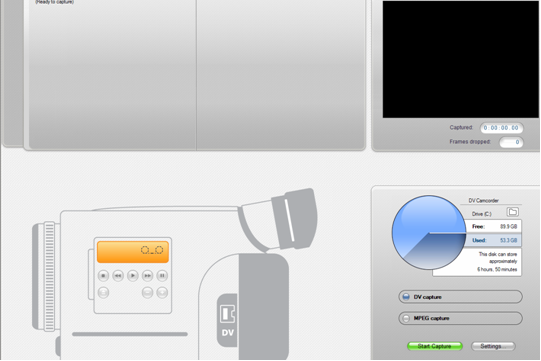 This is a screenshot of the first process. This is a screenshot where you upload your footage. On this you can stop and start it on what footage you want to upload. The clips will upload in different scenes and also when you stopped and started recording on the camera. I like the way this happens because this means the footage doesn't come all together where you would have to break the footage up yourself. It is already done for you.
 This is my second screenshot of where you edit your footage that you have collected. As you can see it is split up into 3 sections. The scenes of the movie you have uploaded, the screen where the movie that you have edited so far where you watch it and then finally the timeline at the bottom of the page where you put all your sounds, clips titles and much more to edit and make the movie/trailer.
 This is the toolbar that is on the side of the programme which allows you to do many things to the videos or pictures that you have imported into the programme. The first icon is where you import a movie that you have already done or a movie that you are still finishing off doing and editing. The second icon which is of a lightning bolt is where you can add as many tranisitions as you want to, to the picture or movie that you have imported. The third icon is where you can add a montage theme onto the pictures or movie that you have put into the clip. This is where it shows one picture then shows the whole screen of pictures and goes into another. I dont think that this is a very good tool to use when you are doing a movie trailer because it doesnt make it look scary which means it doesnt run with the genre of the film. The "T" is where you add titles onto the movie or pictures. This allows you to add writing on the picture, before the picture or at the end of the picture.
 Tuesday, 2 November 2010
Tuesday 2nd November
Today I have been editing some of my clips that I have filmed to see what they look like put together. I have had some fun messing around with the editing and the transistions that I could use. I will play around with this until I get the trailer perfect. I am doing the editing on Pinnacle studio plus 12. I will soon be uploading my first rough cut of my movie and where I think that the clips will go to try and make a story line.

Subscribe to:
Posts (Atom)